
Table of Contents
ToggleIs your PC feeling slow, but you can’t figure out what’s causing it? I built this free Python PC Performance Checker to quickly inspect CPU usage, RAM, storage, and the processes consuming the most memory.
You can copy the script below, run it on your Windows PC, and get a quick performance report in seconds. No advanced Python knowledge is required.
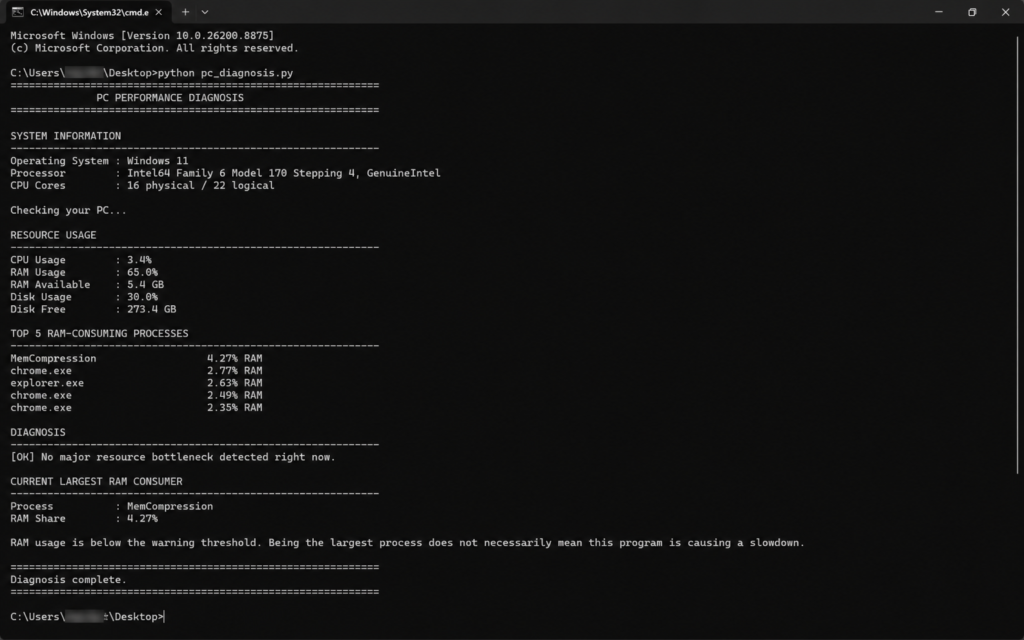
The script checks your current CPU and RAM usage, available memory, disk space, and the programs consuming the most RAM. It also flags unusually high resource usage to help you spot a possible performance bottleneck.
What You Need
Under that paragraph, add another Heading:
What You Need
Then paste:
- Windows 10 or Windows 11
- Python installed
psutilPython library
Under the list, add:
To install psutil, open Command Prompt and run:
python -m pip install psutilFree Python PC Performance Checker
Copy the complete code below and save it as pc_diagnosis.py
					import psutil
import platform
import time

# --------------------------------------------------
# PC PERFORMANCE DIAGNOSIS TOOL
# --------------------------------------------------

print("=" * 60)
print("              PC PERFORMANCE DIAGNOSIS")
print("=" * 60)

# System information
print("\nSYSTEM INFORMATION")
print("-" * 60)

print(f"Operating System : {platform.system()} {platform.release()}")
print(f"Processor        : {platform.processor() or 'Unknown'}")
print(f"CPU Cores        : {psutil.cpu_count(logical=False)} physical / "
      f"{psutil.cpu_count(logical=True)} logical")

# Measure resource usage
print("\nChecking your PC...")
time.sleep(1)

cpu_usage = psutil.cpu_percent(interval=1)
memory = psutil.virtual_memory()
disk = psutil.disk_usage("C:\\")

print("\nRESOURCE USAGE")
print("-" * 60)

print(f"CPU Usage        : {cpu_usage:.1f}%")
print(f"RAM Usage        : {memory.percent:.1f}%")
print(f"RAM Available    : {memory.available / (1024**3):.1f} GB")
print(f"Disk Usage       : {disk.percent:.1f}%")
print(f"Disk Free        : {disk.free / (1024**3):.1f} GB")


# --------------------------------------------------
# FIND RAM-HUNGRY PROCESSES
# --------------------------------------------------

processes = []

for process in psutil.process_iter(
    ["pid", "name", "memory_percent"]
):
    try:
        info = process.info

        if info["memory_percent"] is not None:
            processes.append(info)

    except (
        psutil.NoSuchProcess,
        psutil.AccessDenied,
        psutil.ZombieProcess
    ):
        pass

processes.sort(
    key=lambda process: process["memory_percent"],
    reverse=True
)

print("\nTOP 5 RAM-CONSUMING PROCESSES")
print("-" * 60)

for process in processes[:5]:

    name = process["name"] or "Unknown"

    print(
        f"{name[:30]:<32}"
        f"{process['memory_percent']:.2f}% RAM"
    )


# --------------------------------------------------
# DIAGNOSIS
# --------------------------------------------------

print("\nDIAGNOSIS")
print("-" * 60)

warnings = []

if cpu_usage >= 80:
    warnings.append(
        "HIGH CPU USAGE: Your processor is currently under heavy load."
    )

if memory.percent >= 80:
    warnings.append(
        "HIGH RAM USAGE: Memory pressure may be affecting performance."
    )

if disk.percent >= 90:
    warnings.append(
        "LOW DISK SPACE: Your system drive is nearly full."
    )

if warnings:

    for warning in warnings:
        print(f"[!] {warning}")

else:
    print("[OK] No major resource bottleneck detected right now.")


# --------------------------------------------------
# CONTEXT
# --------------------------------------------------

if processes:

    top_process = processes[0]
    top_name = top_process["name"] or "Unknown"

    print("\nCURRENT LARGEST RAM CONSUMER")
    print("-" * 60)

    print(f"Process          : {top_name}")
    print(
        f"RAM Share        : "
        f"{top_process['memory_percent']:.2f}%"
    )

    if memory.percent >= 80:

        print(
            "\nRAM usage is high. The process above is currently "
            "the largest individual RAM consumer."
        )

    else:

        print(
            "\nRAM usage is below the warning threshold. "
            "Being the largest process does not necessarily mean "
            "this program is causing a slowdown."
        )


print("\n" + "=" * 60)
print("Diagnosis complete.")
print("=" * 60)
How to Run the PC Performance Checker
Then paste:
- Save the code as
pc_diagnosis.py. - Open the folder where you saved the file.
- Click the File Explorer address bar, type
cmd, and press Enter. - Run:
python pc_diagnosis.py- Your PC performance report will appear in Command Prompt.
How to Read the Results
If the tool reports “No major resource bottleneck detected right now,” your CPU, RAM, and storage are within the script’s warning thresholds at that moment.
If it flags high CPU, high RAM usage, or low disk space, use the process list to investigate further. Remember, the program using the most RAM isn’t automatically the cause of a slow PC.
What This Tool Can’t Detect
This is a quick resource checker, not a complete hardware diagnostic tool. A slow PC can also be caused by overheating, thermal throttling, driver problems, failing storage, background updates, malware, or hardware issues that this script doesn’t test.
Still Not Sure What’s Slowing Down Your Laptop?
The Python checker gives you a quick snapshot, but some slowdowns need a deeper look. Try our free Slow Laptop Diagnosis Tool to narrow down the likely cause based on the symptoms you’re experiencing.